


+86-13826948503 (Bella)
+86-18145725878 (Carven)


You might have heard of type c micro usb. You may wonder if it is a real connector. Many people mix up usb connector names. This can make it hard to choose the right cable. Picking the wrong cable can hurt your devices. Knowing the differences helps you choose the right cable. It also helps you keep your devices safe. Good cable assembly and strong rules help your devices work well. They also help your devices stay safe.
USB Type-C and micro USB are not the same. USB-C is oval and you can plug it in both ways. Micro USB is smaller and only goes in one way.
USB-C can move data faster and gives more power. It can charge things quickly and send files up to 10 Gbps.
Always look at your device's port before you buy a cable. If you use the wrong cable, your device might get hurt.
Pick cables that are certified and from good brands. Certified cables keep your devices safe and work better.
USB-C is used in most new devices now. Many old devices still use micro USB, so you need to check if they match.
You may see the term "type c micro usb" on some products or in online stores. This term can cause confusion. It is not an official connector type. Instead, it mixes up two different USB connectors: USB-C and micro USB. These two connectors look different and work in different ways.
Here is a simple table to help you see the difference:
Connector Type | Definition | Standards |
|---|---|---|
USB Type-C | A connector with an oval shape. You can plug it in either way. It supports fast data transfer and high power delivery. | Follows USB-IF standards for speed, shape, and size. |
micro-USB | A smaller connector used mostly for older phones and devices. It only fits one way. It has lower speed and power. | Older standard, less power and speed than USB Type-C. |
You may notice that some cables look similar. USB-C and micro USB both have small connectors, but they are not the same. USB-C is newer and supports more features. Micro USB is older and has fewer features.
Manufacturers like Huamao Electronics use high-quality materials and follow strict standards. This helps prevent problems like overheating or poor connections. Certified cables, such as those that meet USB-IF and UL standards, keep your devices safe and working well.
Many people think "type c micro usb" is a real connector. This is not true. Here are some common mistakes people make:
Some believe all USB-C cables do the same thing. In fact, not every USB-C cable supports fast charging, data transfer, or video output.
Many think USB-C has replaced all older connectors. In reality, many devices still use micro usb or micro-usb for compatibility.
The shape of the connector can trick you. USB-C and micro USB look similar in size, but they are not interchangeable.
You might see products labeled as "type c micro usb" cables. These often try to show that the cable can connect a USB-C device to a micro USB port, or vice versa. Always check your device’s port before buying a cable.
Tip: Buy cables that are clearly labeled and certified, such as USB-C, USB 3.1, or USB PD compliant. This helps you avoid mix-ups and keeps your devices safe.
Cable assembly companies work hard to label their products correctly. They use clear names and follow strict testing standards. This helps you pick the right cable and avoid damage to your devices.
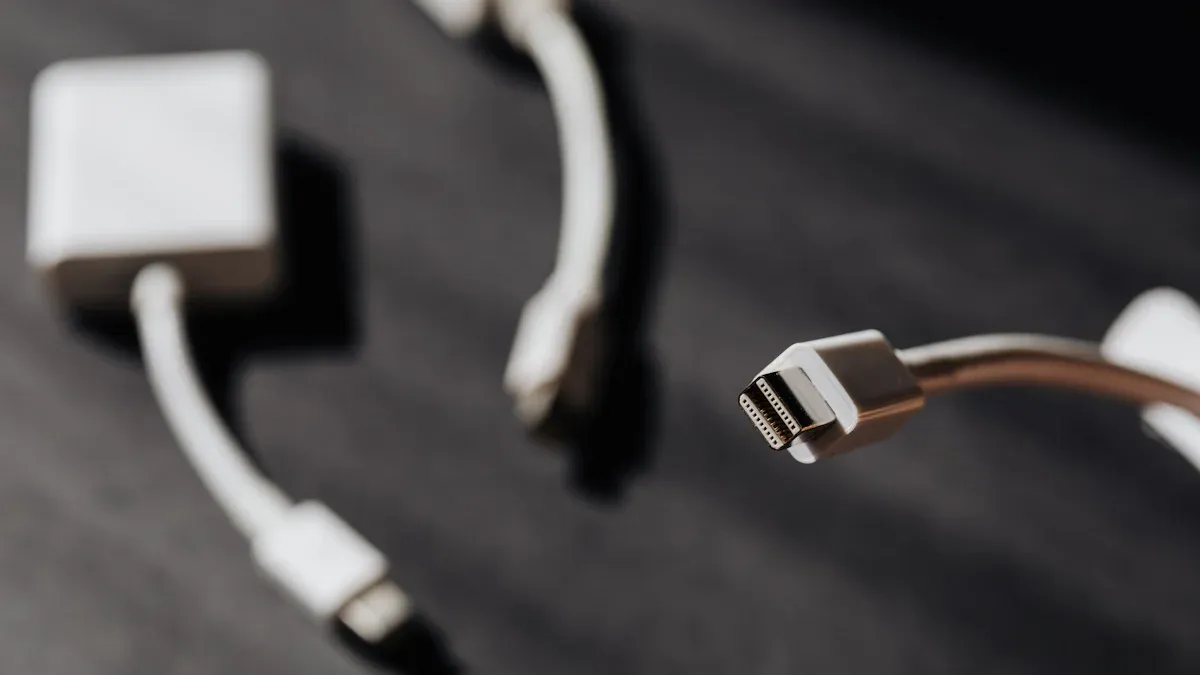
You can tell type-c ports and micro-usb ports apart by their shapes and sizes. USB-C connectors are oval and you can plug them in both ways. Micro usb connectors are smaller and only fit one way. This makes usb-c easier for people to use.
Here is a table that shows the main physical differences:
Feature | USB-C | Micro-USB |
|---|---|---|
Size | Works with small devices and big PCs | Smaller, used in mobile devices |
Shape | Plug goes in both ways | Plug goes in one way |
Pin Configuration | More pins for faster speeds | Fewer pins, narrower than USB-C |
Common Usage | New smartphones, laptops | External hard drives, cameras |
Future Outlook | Becoming the standard | Still in use, but outdated |
You will see usb-c ports on new phones and laptops. Micro-usb ports are found on older devices. USB-C has extra pins for better performance and more features.
USB-C cables move data faster and give more power than micro usb cables. You can use usb-c for quick charging and moving big files. Micro usb cables are slower and have less power.
Here is a table showing the top speeds for different usb standards:
USB Standard | Maximum Speed |
|---|---|
USB 1.0 | 12 Mb/s |
USB 2.0 | 480 Mb/s |
USB 3.0 | 5 Gb/s |
USB 3.1 | 10 Gb/s |
USB 3.2 | 20 Gb/s |
USB4 | 40 Gb/s |
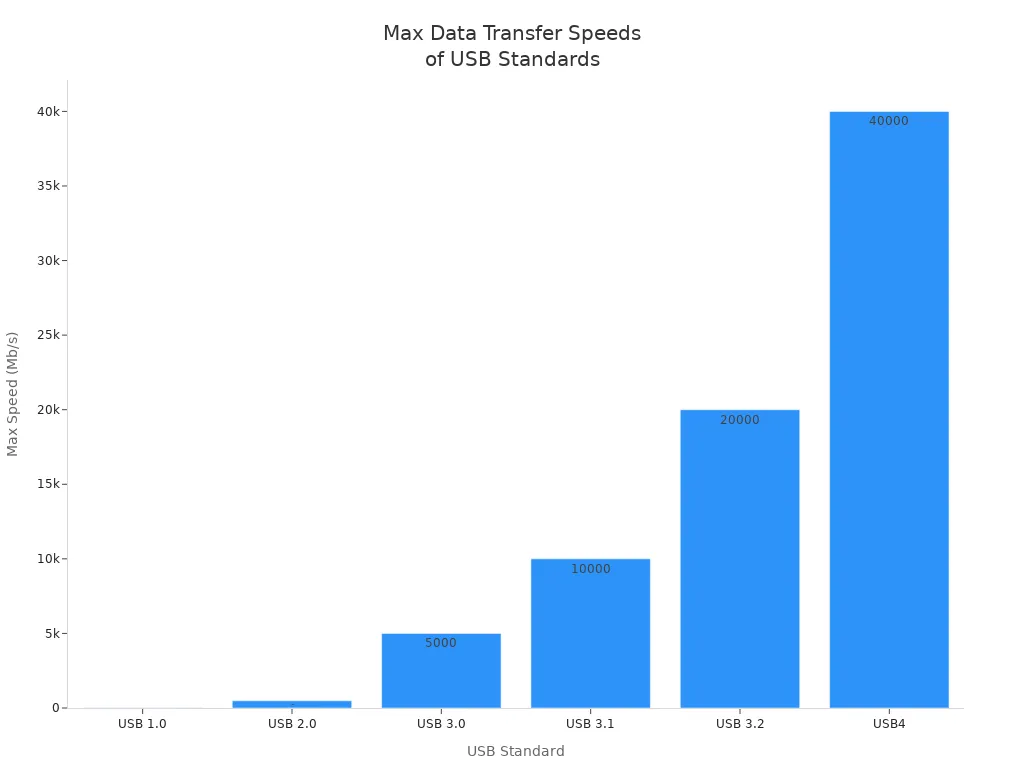
USB-C supports the newest standards, like USB4, which can reach up to 40 Gb/s. Micro usb usually works with USB 2.0 or USB 3.0, so it cannot go as fast as usb-c.
Power delivery is another big difference. USB-C can give up to 240 watts with USB PD 3.1. Micro usb cannot give this much power. Here is a table showing the power delivery:
Specification | Maximum Power | Maximum Voltage | Maximum Current |
|---|---|---|---|
USB PD 3.0 | 100 W | 5/9/15/20 V | 5 A |
USB PD 3.1 | 240 W | 28/36/48 V | 5 A |
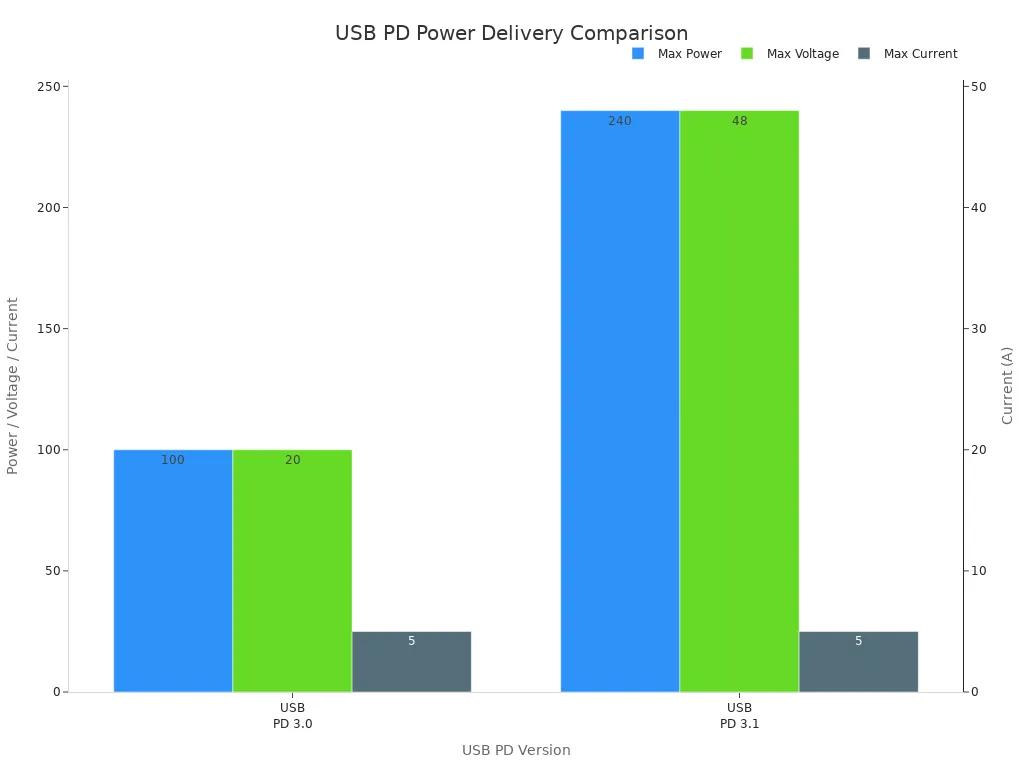
You get faster charging and more power with usb-c. This helps you charge laptops, tablets, and phones quickly.
You will find usb-c on new smartphones, laptops, and modern devices. Micro usb is still used on older Bluetooth speakers, some Android phones, digital cameras, GPS devices, and video game controllers.
Here is a table showing which devices use each connector:
Connector Type | Common Devices |
|---|---|
USB-C | New smartphones, laptops, modern devices |
Micro-USB | Older Bluetooth speakers, Android phones, cameras, GPS devices, controllers |
You can check your device’s port to see which cable you need. USB-C is becoming the standard for new devices. Micro-usb ports are still used in many older products.
USB-C is now used in:
New smartphones
Laptops
Other modern devices
Micro usb is still found in:
Older Bluetooth speakers
Certain Android phones
Digital cameras
GPS devices
Video game controllers
Most new devices have switched from micro usb to usb-c in the last five years. In 2015, Google and Apple started using usb-c in laptops. In 2016, Samsung added usb-c to its phones. In 2022, the EU said phones and small devices must use usb-c. This made usb-c even more popular.
Note: When you pick cables, choose high-quality usb-c options from trusted companies like Huamao Electronics. Good cable assembly and strong testing help your devices work safely and well.
Usb-c is better than older connectors. One big advantage is fast charging. Usb-c lets you charge your devices much faster. It supports higher charging currents. This means your phone or laptop charges quickly. Usb-c also moves data at high speeds. You can transfer files up to 10 Gbps. Micro-USB only goes up to 480 Mbps. Usb-c is great for moving big videos or backing up your phone.
Advantage | USB Type-C | Micro-USB |
|---|---|---|
Charging Speed | Charges faster and gives more power | Charges slower |
Data Transfer Speed | Moves data very fast | Moves data slowly |
Design | You can plug it in both ways | Only plugs in one way |
Durability | Built stronger and lasts longer | Not as strong |
Compatibility | Used in new devices | Used in older devices |
Usb-c lets you charge and move data at the same time. This makes things easier and faster for you.
Usb-c has a special design. You can plug it in either way. You do not need to check which side is up. This makes it easy to connect your devices. It helps when you are in a hurry or in the dark. The reversible design keeps your ports safe. Your devices last longer because there is less damage. The slim shape fits well in new devices.
You never need to flip the cable to plug it in.
Usb-c’s design helps stop damage to the cable and port.
You get a better experience and the connector lasts longer.
Type-c ports are now used in most new devices. You see them in smartphones, laptops, and tablets. People want faster charging and better data transfer. This makes usb-c more popular every year. Experts think most electronics will use usb-c by 2025. People want easy connections and high performance.
Companies like Huamao Electronics make sure usb-c connectors are safe. They use strict rules and test every product. They have certifications like ISO9001 and UL. You can trust usb-c cables from these companies.
Tip: Pick usb-c products from trusted companies. Make sure they test and check their products. This helps you enjoy all the good things about type-c ports.
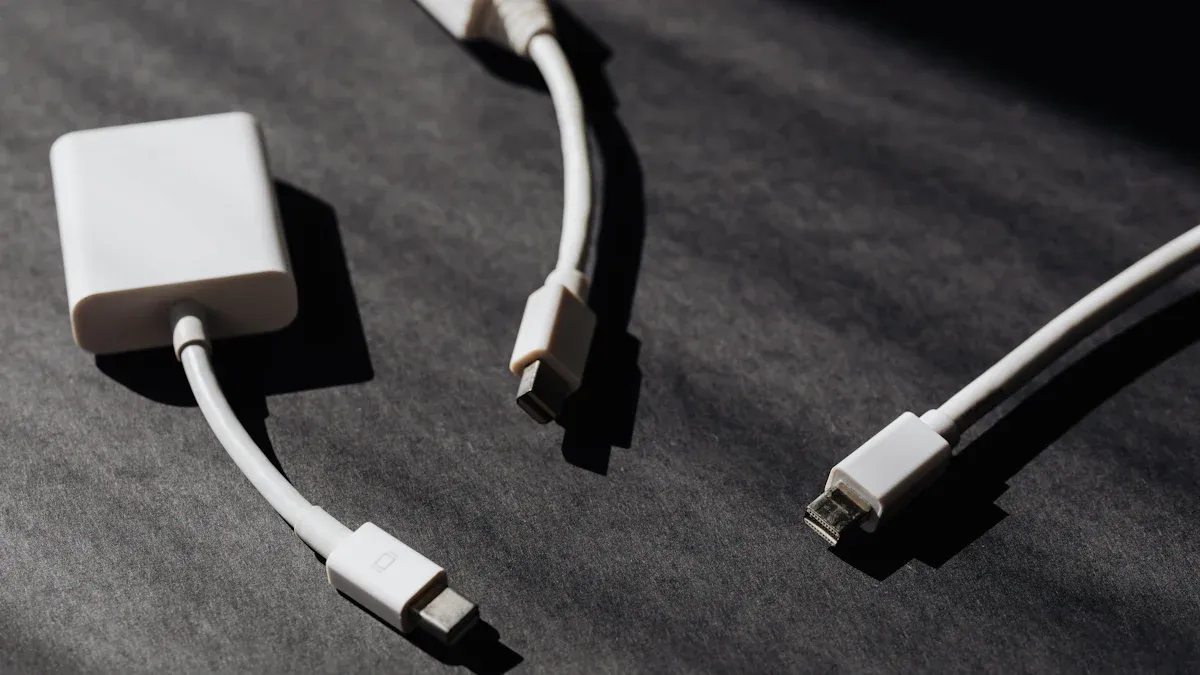
Before you buy a usb cable, check your device’s ports. Each port has its own shape and size. This helps you pick the right cable and keeps your device safe. Look at your device and where you plug in the charger. Use this list to help you:
USB-A: Flat and rectangle-shaped. You find it on computers and chargers.
USB-B: Square with slanted corners. It is used for printers and scanners.
USB-C: Small and oval. You can plug it in either way. New phones and laptops use type-c ports.
Mini-USB: Smaller than USB-A or USB-B. It is used in old cameras and MP3 players.
Micro usb: Small and shaped like a trapezoid. Many smartphones use it.
If you are not sure, check your device’s manual or look up your device online. Manuals and company websites show pictures and details. Here is a table to help you see the differences between usb type-c and micro usb ports:
Feature | USB Type-C | Micro-USB |
|---|---|---|
Design | Oval, reversible | Rectangular, non-reversible |
Transfer Rate | 5 to 10 Gbps | Lower than USB-C |
Power Delivery | Up to 100 watts | Limited power delivery |
Common Usage | Newer devices like laptops and phones | Older devices |
Sometimes you need a usb-c to micro usb cable. This is for connecting new devices to old ones. These cables have different ends. One end is type-c, the other is micro usb. You must match the cable ends to your device’s ports.
Some devices may not support fast charging or fast data transfer. Not all products have the right power parts inside. Your device might charge slowly or not work with some usb-c cables. Always check your device’s details before you buy a cable.
USB-C connectors fit many devices, but power rules can change.
Some devices only work with their own charger.
Different cables follow different usb rules, which can cause problems.
Always pick cables and connectors that meet strong quality rules. At Huamao Electronics, we use good materials and careful cable assembly. We test every cable to make sure it is safe and works well. Our cables and connectors, like terminal connector and cable assembly products, have certifications such as UL, CE, RoHS, and USB-IF.
Certification | Description |
|---|---|
UL | Safety checks for cables. |
CE | Follows EU safety and EMC rules. |
RoHS | Limits harmful materials. |
USB-IF | Confirms usb logo use and quality. |
We use careful soldering and injection molding. This makes each cable strong and long-lasting. We test at every step, from start to finish. This makes sure your usb cables work well and last a long time. When you pick cables from Huamao Electronics, you get products you can trust for type-c ports and micro usb ports.
Tip: Always buy certified cables and connectors. This keeps your devices safe and helps them work their best.
You should know how USB Type-C and micro usb are different. This helps you pick the right cable for your usb device and usb port. Check this table to remember the main differences:
Feature | USB Type-C | Micro USB |
|---|---|---|
Design | Symmetrical, reversible orientation | Asymmetrical, non-reversible |
Data Transfer Speed | Supports SuperSpeed USB 10 Gbps | USB 2.0 or USB 3.0 speeds |
Power Delivery | Higher power levels for fast charging | Limited power delivery capabilities |
Always look at your usb port before you buy a cable. Make sure the cable matches your usb device and usb port. Pick cables with certifications like UL and ISO9001:2015 from trusted brands such as Huamao Electronics. This helps your usb device work well and keeps your usb port safe. You will avoid mistakes and get the best use from your usb device and usb port.
Tip: Pick the right cable for your usb device and usb port. Use certified cables from Huamao Electronics for safety and good quality.
You can see the difference by looking at the shape. USB-C has an oval shape and works both ways. Micro USB has a smaller, one-way design. USB-C supports faster charging and data transfer.
No, you cannot plug a USB-C cable directly into a micro USB port. You need a special adapter or a cable with both ends. Always check your device’s port before choosing a cable.
Look at the charging port. If it is oval and you can plug the cable in either way, your device uses USB-C. You can also check your device’s manual or the manufacturer’s website.
Certified cables pass safety and quality tests. They protect your devices from damage. You get better performance and longer cable life. Companies like Huamao Electronics offer certified and tested cables.
Check your device’s port and read the manual. Ask the seller for help or visit the manufacturer’s website. You can also contact Huamao Electronics for advice on choosing the right cable.
