


+86-13826948503 (Bella)
+86-18145725878 (Carven)


Can you splice a USB-C cable? This question arises when cables break or need modification. USB-C cables are essential in modern electronics, handling data, power, and video transmission.In this article, we'll explore whether it's possible to splice a USB-C cable, the risks involved, and alternatives to consider.
Splicing is the process of joining two or more cables together, typically by cutting and connecting their internal wires. This is commonly done when a cable is damaged, or when users need to extend a cable's length. It involves stripping back the cable’s insulation, exposing the wires, and then reconnecting the necessary parts using methods like soldering or twisting.
People consider splicing USB-C cables mainly for two reasons: repairing a broken cable or extending its length. Over time, cables can suffer wear and tear, or the connectors might get damaged. Rather than replacing the entire cable, splicing offers a way to fix it at a fraction of the cost. Some users also choose to splice cables to extend their reach, especially when they need a longer USB-C cable than what is available.
Splicing simpler cables, like USB-A or USB-B, is usually easier due to fewer internal wires. These cables typically have just a few wires, making them simpler to connect. In contrast, USB-C cables are more complicated. They have multiple wires that handle data, power, and sometimes video signals. This makes splicing USB-C cables trickier, as each wire must be connected properly to maintain the cable’s performance across all functions.
Splicing a USB-C cable is much more complex than splicing older cables. This is primarily because USB-C cables have multiple internal wires that serve various functions, such as data transfer, power delivery, and video signals. Unlike simpler cables, which only have a few wires to deal with, a USB-C cable typically has at least four wires, making it more difficult to reconnect everything correctly. If any of these connections are improperly spliced, it could result in data loss, charging issues, or even physical damage to the connected devices.
The complexity increases even further if your USB-C cable supports power delivery or video output. These cables include even more wires that need to be properly aligned for the cable to function effectively. As a result, splicing a USB-C cable requires more precision, patience, and knowledge than splicing older, simpler cables like USB-A or USB-B.
If you decide to attempt splicing your USB-C cable, there are several tools you will need:
Wire Cutters/Strippers: These are essential for cutting the cable to the desired length and for stripping the outer insulation and individual wires.
Soldering Iron and Solder: For making secure and reliable connections between the exposed wires, a soldering iron and solder are required. Soldering helps create a strong bond and ensures that the wires will stay in place.
Heat Shrink Tubing: After the wires are soldered, heat shrink tubing is used to protect the soldered connections. It insulates the wires and helps prevent shorts or damage.
USB-C Coupler (alternative to splicing): If you don't want to risk splicing, a USB-C coupler might be a safer and easier solution. A coupler lets you join two cables together without the need for any splicing, making it a great alternative for those who want a quick fix without the complexity.
While it is technically possible to splice a USB-C cable, it’s important to understand that doing so correctly requires a fair amount of skill and the right tools.
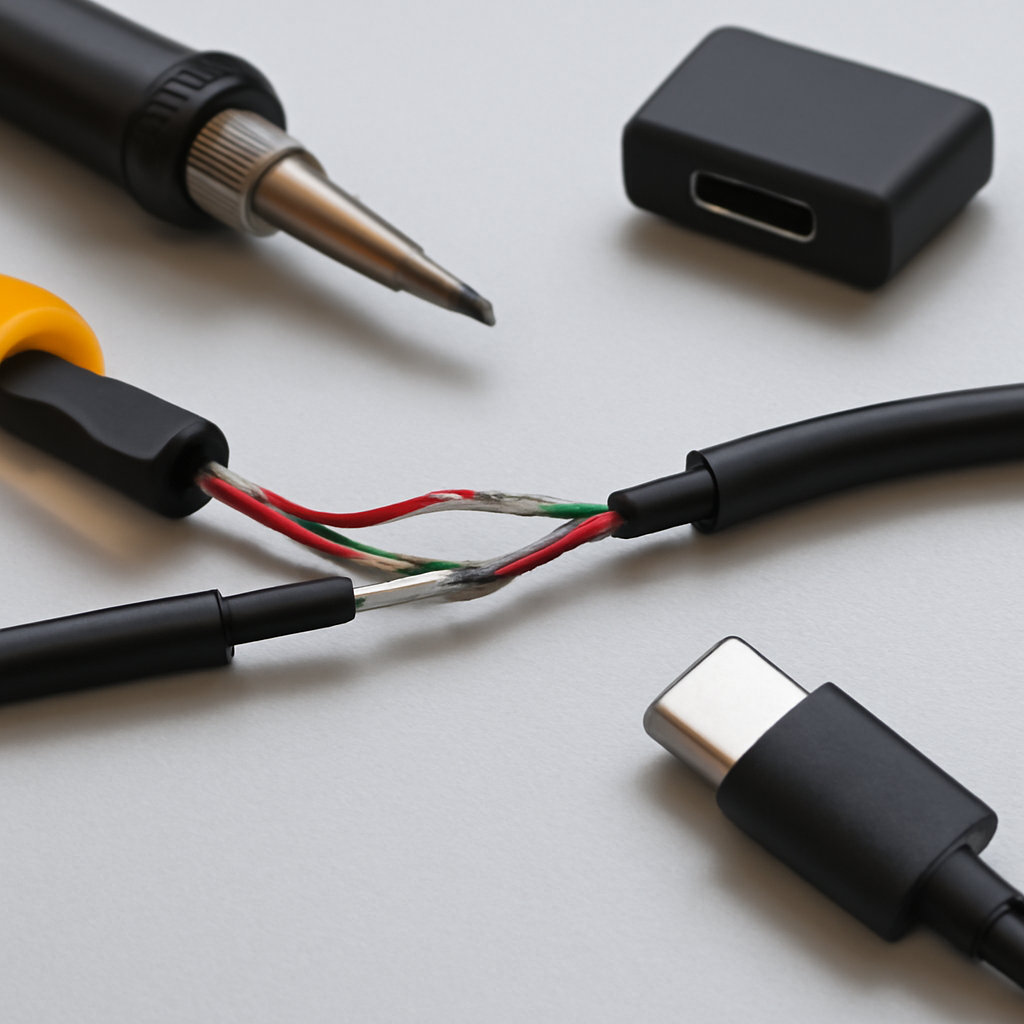
Cutting the Cable – First, use wire cutters to cut the USB-C cable to the desired length. Ensure the cut is clean and straight, avoiding any damage to the internal wires. Make sure to cut both cables you plan to splice, leaving enough length for easy handling.
Stripping the Insulation – Once the cables are cut, you’ll need to strip the outer jacket of each cable. Use a razor blade or wire stripper to carefully remove the insulation, exposing the internal wires. Be gentle when stripping the wires to avoid damaging them. You should see four internal wires: red, green, black, and white, each covered in its own insulation.
The next step is to connect the exposed wires. This is where precision becomes important.
Begin by matching the wire colors between the two cables. Red should go with red, green with green, black with black, and white with white. This ensures the correct transmission of power, data, and any other signals.
Once the wires are aligned, use a soldering iron to carefully melt a small amount of solder onto each connection. Hold the soldering iron to the wire joint for just a few seconds to ensure the solder melts and bonds the wires together. Avoid overheating the wires, as this can cause damage.
Now, you need to protect the newly soldered connections. This step is crucial to prevent short circuits or other issues that could arise from exposed wires.
Heat Shrink Tubing is used to cover the soldered areas. Slide a piece of heat shrink tubing over each wire splice before applying heat. Make sure the tubing covers both the wire and the exposed section of the cable.
To shrink the tubing, use a heat source, such as a heat gun or a lighter. Hold the heat source near the tubing, but not too close, as this could melt the tubing too quickly. Gently rotate the cable to ensure the tubing shrinks evenly and tightly around the splice.
After the splice is completed, it’s important to test the cable to ensure it’s functioning properly.
Use a multimeter to check the continuity of each wire connection. This will help you verify if the soldering was successful and whether all wires are properly connected.
If the splice doesn’t work, double-check the soldered connections. Make sure each wire is properly aligned and that the solder bonds are secure. If necessary, re-solder the wires and test again.
USB-C cables are much more complex than older USB cables. Unlike the simpler USB-A or USB-B cables, which have just a few wires inside, USB-C cables contain multiple wires that serve different purposes. These cables typically have at least four wires, and some even have more, depending on whether they support data, power, and video transmission. The most common internal wires include those for power (5V or more), data (usually two for transmitting and receiving), and ground. The more wires involved, the more difficult it is to splice them properly.
These multiple wires affect how the cable works. If you don’t connect the correct wires, you might face issues like device malfunction, slow charging, or even data loss. Each wire in a USB-C cable is designed for a specific task, so one small mistake in matching them could lead to problems with either power or data transmission.
When splicing USB-C cables that support Power Delivery (PD) or data transfer, extra care is needed. PD cables allow devices to communicate about power needs, enabling faster charging or handling higher wattages. If these wires aren’t connected properly, the cable might not deliver the correct power or even cause overheating.
Data transfer is another critical consideration. USB-C cables can handle high-speed data, which is necessary for activities like transferring large files or streaming video. When splicing, ensure that the data lines are correctly connected. Any mistakes here could lead to slow data transfer, or worse, data corruption. It’s essential to maintain the integrity of the data lines to avoid these issues.
In short, splicing USB-C cables can be challenging, especially if they support more advanced features like PD or high-speed data transfer. Making sure each wire is correctly aligned and soldered is crucial to maintaining the cable’s functionality.
Splicing a USB-C cable may seem like a simple solution, but there are risks involved. One of the main risks is damaging the cable or the connected device. If the wires aren’t spliced correctly, it could result in poor connections or even cause physical damage to the cable. Overheating the wires during soldering can also weaken the cable, affecting its performance.
Another major risk is creating a short circuit. Short circuits happen when wires that shouldn’t be connected touch each other, leading to potential damage. This can be avoided by making sure that each wire is insulated properly and that no exposed wires are touching each other. Using heat shrink tubing is crucial in this case to protect the wires and prevent any accidental shorting.
Additionally, splicing a USB-C cable yourself may void the warranty of your device. Manufacturers typically do not cover repairs if the cable or connectors are modified in any way. Even if the cable seems to work after splicing, it’s important to understand that any future issues could be difficult to address under warranty.
While it is possible to splice a USB-C cable, it’s crucial to consider these risks before proceeding.
Sometimes, purchasing a new USB-C cable is more cost-effective than attempting to splice one. Splicing can take time, and if done incorrectly, it may result in a cable that doesn’t function properly. A high-quality replacement cable might cost a little more upfront, but it will save you the hassle of dealing with potential issues down the road. Certified USB-C cables, especially those from trusted brands, are built to last longer and offer reliable performance for data, power, and video transmission.
When looking for a replacement, always look for certified cables. Certified cables meet specific safety standards and ensure optimal performance. These cables are less likely to fail under high use and can be trusted to work with all your devices. Check for labels or specifications such as USB 3.1, USB 3.2, or Thunderbolt 3 to ensure you're buying the right cable for your needs.
If you’re not comfortable splicing the cable yourself or need it done correctly, seeking professional help might be the best option. Professionals have the right tools and expertise to ensure the splice is done safely and properly, preventing damage to the cable or device.
If you’ve attempted splicing and the cable still doesn’t work, it may be time to consult an expert. Professional repair services can not only fix your cable but also offer advice on how to avoid similar issues in the future. An expert can help prevent costly mistakes and ensure the splice won’t affect your device's functionality.
To keep your USB-C cables in good condition, it’s important to take simple precautions.
Avoid Excessive Bending: One of the easiest ways to damage a USB-C cable is by bending it too much. When the cable is bent repeatedly, the internal wires can break or fray. Try to keep your cable straight and avoid sharp bends, especially near the connectors.
Proper Storage: Storing your cables properly helps prevent wear and tear. Rather than leaving them tangled in a drawer, roll them up gently and store them in a protective case or cable organizer. This keeps them from getting crushed or stressed.
Avoid Heat Sources: Heat can degrade the insulation of a USB-C cable and weaken its structure. Always keep your cables away from hot surfaces or direct sunlight. Heat can cause the wires inside to degrade over time, which can lead to charging or data transfer issues.
By following these simple tips, you can extend the lifespan of your USB-C cables and prevent the need for frequent replacements or repairs.
Splicing a USB-C cable involves several complexities and risks, especially due to the numerous wires inside. Improper splicing could lead to damaged cables, short circuits, or device issues. While it’s possible to splice, opting for a new, certified cable is often more cost-effective and safer for long-term use. If you need futher information, check to see more about our products.
1. Can I splice a USB-C cable myself?
Yes, it’s possible, but it requires precision. Incorrect splicing may lead to cable damage or device issues.
2. What tools do I need to splice a USB-C cable?
You’ll need wire cutters, a soldering iron, heat shrink tubing, and possibly a USB-C coupler.
3. Is splicing a USB-C cable safer than buying a new one?
Splicing can be risky, as improper connections may cause damage. A new cable is often safer and more reliable.
4. How do I avoid damaging my USB-C cable?
Avoid excessive bending, store it properly, and keep it away from heat sources.
5. What are the alternatives to splicing a USB-C cable?
You can replace the cable with a high-quality certified one or seek professional repair services.
